
Location is one of the most underused dimensions in B2B email marketing. While many teams segment by industry or job title, they often overlook geography, even though it can significantly improve relevance and response rates.
With BuddyCRM, proximity targeting is simple. Using our Google Maps integration and campaign tools, you can build segments based on location and send targeted campaigns to the right people in the right places, all without leaving the CRM.
Here’s how it works.
Create Radius-Based Segments in Minutes
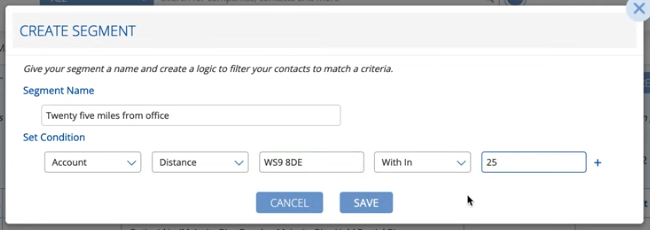
In BuddyCRM, you can create a segment of contacts based on how close they are to a specific location, such as a branch office, event venue, or service centre.
To build one:
- Choose a postcode or address as your centre point
- Set a radius (for example, 25 miles)
- Add other filters like industry, customer type, or account owner
- Save the segment to reuse in future campaigns
This feature is ideal for targeting contacts near an event, focusing on customers within a rep’s region, or promoting services available only in certain areas.
Build and Send Campaigns with Local Relevance
Once you’ve created your segment, it can be used immediately in BuddyCRM’s built-in campaign tool.
You can:
- Clone a previous email or start a new template from scratch
- Personalise content for the local audience (e.g. referencing nearby locations, event details, or assigned reps)
- Use merge fields and tags as you would with any campaign
- Monitor opens, clicks, and engagement by region
Because everything happens inside BuddyCRM, there’s no need to export lists, upload to external platforms, or manage data across multiple systems. Your audience is already segmented and ready to engage.
Use Cases Where Proximity Targeting Works Best
Proximity-based segments help you focus your messaging and avoid sending irrelevant emails to contacts outside a campaign’s geographic scope. Some examples:
- Local event invites: Only email leads or clients near the venue
- Regional account introductions: Announce new reps to contacts in their territory
- Territory-based offers: Promote location-specific services or discounts
- Customer visit alerts: Let clients know when your team will be in their area
These kinds of campaigns not only improve open and click rates. They also help build trust by showing your communications are tailored and relevant.
Smarter Segments, Better Engagement
Radius-based segments are one more way BuddyCRM helps you move faster without losing focus. By combining location filters with the rich data already in your CRM, you can create precise, purposeful campaigns that don’t waste time or inbox space.
Everything from segmentation to sending is handled within BuddyCRM, so your data stays connected, your team stays aligned, and your campaigns stay relevant.
Want to see how location targeting can improve your next campaign? Log in to BuddyCRM and try building your first proximity-based segment.